
Plotting
df.plot and series.plot render charts to SVG strings with no dependencies, so the same call works in a script, a server, a notebook or a static site. Pass path to write a .svg file, or a .html file that also includes a data table.
Charts follow a fixed visual system: a colour-blind-safe palette assigned in a fixed order, automatic light and dark themes, thin marks, a recessive grid, a legend whenever there are two or more series, and native hover tooltips on every mark. There is deliberately no secondary y axis — plot two measures in two charts (subplots: true).
Line and area
import * as pd from 'pandasx';

const df = new pd.DataFrame(
  { visits: [120, 135, 128, 160, 172, 190, 185], signups: [12, 15, 11, 19, 22, 25, 21] },
  { index: pd.dateRange('2024-03-01', { periods: 7, freq: 'D' }).toArray() as Date[] },
);
df.plot.line({ title: 'Traffic, first week of March', ylabel: 'Count', path: 'line.svg' });
df.plot.area({ y: 'visits', title: 'Visits', path: 'area.svg' });

Bars
import * as pd from 'pandasx';

const df = new pd.DataFrame({ north: [12, 19, 7], south: [9, 14, 11] }, { index: ['Q1', 'Q2', 'Q3'] });
df.plot.bar({ title: 'Units by quarter', path: 'bar.svg' });
df.plot.bar({ stacked: true, title: 'Units by quarter, stacked', path: 'bar-stacked.svg' });
df.get('north').plot.barh({ title: 'North', path: 'barh.svg' });


Distributions
import * as pd from 'pandasx';

// a deterministic, roughly normal sample
const sample = Array.from({ length: 400 }, (_, i) => {
  let u = 0;
  for (let k = 1; k <= 6; k++) u += ((i * 7919 * k) % 1000) / 1000;
  return Math.round((u - 3) * 15 + 50);
});
const s = new pd.Series(sample, { name: 'score' });
s.plot.hist({ bins: 20, title: 'Score distribution', path: 'hist.svg' });
s.plot.kde({ title: 'Score density', path: 'kde.svg' });

const groups = new pd.DataFrame({ a: sample.slice(0, 100), b: sample.slice(100, 200).map((v) => v + 8), c: sample.slice(200, 300).map((v) => v - 5) });
groups.plot.box({ title: 'Scores by group', path: 'box.svg' });


Scatter, hexbin and pie
import * as pd from 'pandasx';

const n = 60;
const x = Array.from({ length: n }, (_, i) => i);
const df = new pd.DataFrame({
  spend: x.map((i) => 10 + i * 1.5 + ((i * 37) % 11)),
  revenue: x.map((i) => 40 + i * 4 + ((i * 53) % 23)),
  margin: x.map((i) => (i * 17) % 30),
});
df.plot.scatter({ x: 'spend', y: 'revenue', c: 'margin', title: 'Revenue vs spend (colour: margin)', path: 'scatter.svg' });

new pd.Series([45, 30, 15, 10], { index: ['Search', 'Direct', 'Social', 'Email'] })
  .plot.pie({ title: 'Traffic source', path: 'pie.svg' });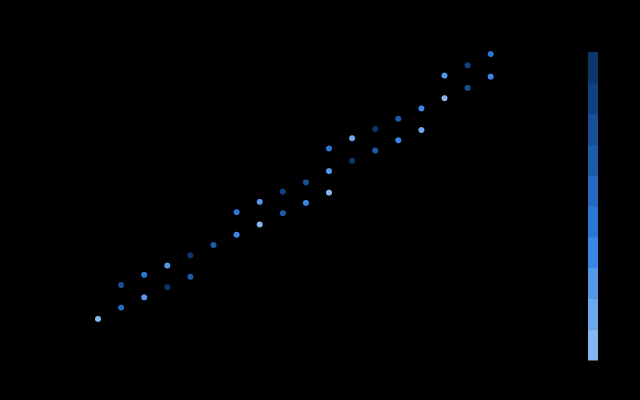

Subplots
import * as pd from 'pandasx';

const df = new pd.DataFrame({
  revenue: [120, 135, 150, 149, 170, 182],
  customers: [1.2, 1.25, 1.31, 1.33, 1.4, 1.46],
}, { index: ['Jan', 'Feb', 'Mar', 'Apr', 'May', 'Jun'] });
df.plot({ subplots: true, layoutColumns: 2, title: 'Revenue and customers', path: 'subplots.svg' });
Options
| Option | Meaning |
|---|---|
kind | line, bar, barh, hist, box, kde / density, area, pie, scatter, hexbin (or call df.plot.<kind>()) |
x, y | Column for the x axis (default: the index) and column(s) to plot (default: all numeric) |
title, xlabel, ylabel | Text |
width, height | Size in pixels |
legend, grid | Toggle the legend and horizontal gridlines |
stacked | Stack bars or areas |
bins | Histogram bins (default 10) |
logy, xlim, ylim | Axis scale and limits |
subplots, layoutColumns | One small chart per series |
theme | 'auto' (follows the viewer's colour scheme), 'light' or 'dark' |
c, s | Scatter: column that colours the dots, dot radius |
gridsize | Hexbin grid size |
path | Write to .svg, or .html (chart plus data table) |
Charts take at most eight series: more would need repeated colours. Group the long tail into an "Other" column, or use subplots.
In a web page
The return value is an SVG string. Put it straight into the DOM, or wrap it with pd.plotHtml(svg, df, title) for a standalone page:
app.get('/chart', (req, res) => res.type('image/svg+xml').send(df.plot.line({ title: 'Sales' })));